
As multi-tenant Kubernetes platforms grow, most teams watch CPU, memory, storage, and cloud spend. Far fewer watch the number of routing rules accumulating in front of the platform. That blind spot can become a real deployment blocker.
In a recent customer environment, Shakudo traced an urgent upgrade risk to a deceptively simple pattern: each new project was adding roughly six domains, and each subdomain was creating two load balancer rules. Nothing was failing because traffic volume was too high. The bottleneck was control-plane sprawl.
That matters well beyond one customer. AWS documents a default quota of 100 rules per Application Load Balancer excluding the default rule. Quotas can be adjusted, but the bigger lesson is architectural: if your platform automatically creates hosts, environments, and routes, rule growth can silently become a scaling constraint.
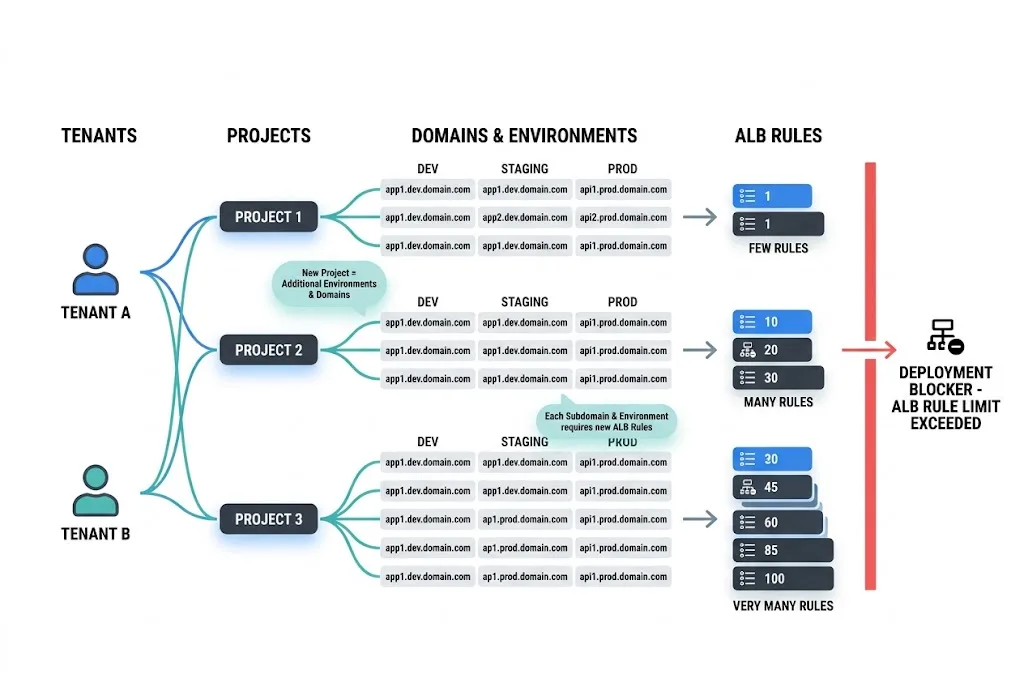
The useful lesson from this case is that the failure mode was not obvious from normal platform dashboards. There was no single dramatic CPU spike, no sudden storage event, and no classic “the cluster is down” signal. Instead, the team noticed that routing complexity was growing linearly with every new project.
In this environment, the growth math looked something like this:
That combination turned a normal production upgrade into a blocker.
This is exactly the kind of issue that platform teams building an enterprise AI agent infrastructure stack or trying to deploy AI agents on Kubernetes should pay attention to early. Rule growth often hides inside “just one more hostname” decisions until the platform reaches enough tenant and environment density for those decisions to compound.
There are a few reasons this problem shows up late:
Adding one more hostname or path looks harmless in isolation. The problem is that self-service platforms rarely add just one. They add many, and they keep adding them.
Teams usually monitor traffic, latency, cost, and pod health. Fewer teams actively monitor listener rule growth, ingress object sprawl, or the number of host-based routes generated per tenant.
They can buy time, but they do not simplify the architecture. If the routing pattern itself is inefficient, raising the ceiling just delays the next incident.
Many platform teams create separate subdomains for:
That is a reasonable pattern. The problem is not the naming convention itself. The problem is what happens when each of those names turns into separate routing entries.
A platform may feel manageable at 10 projects. It becomes very different at 50 or 100 projects when every service pattern is repeated across multiple environments.
This is especially true in self-service environments with provisioning flows, ephemeral deployments, or automated pipelines on the Shakudo Platform that create routes as part of standard operations.
Many enterprise platforms do not stop at raw ingress. They also add a service mesh or gateway layer for policy, security, and traffic management.
That is often the right call. But it means your routing model now spans:
In this case, the team also had Istio-related behavior to consider. That matters because wildcard design has to be correct across layers, not just in one place.
The breakthrough in this case was not “optimize the cluster harder.” It was much simpler:
collapse many explicit host rules into wildcard host patterns wherever the domain model allows it.
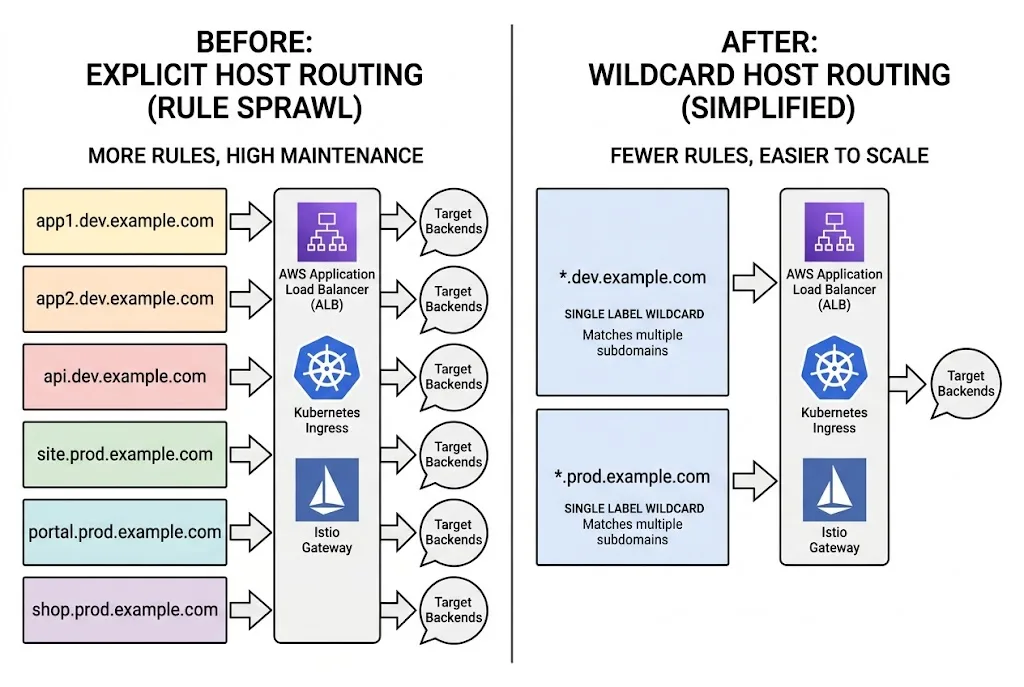
Instead of creating one routing rule per subdomain, the team used wildcard-style routing to consolidate many hosts under fewer load balancer entries.
Wildcard host rules reduce the rate at which rule count grows.
Instead of handling routes like this:
you can often handle a whole family of related subdomains with a pattern like:
That does not solve every routing problem, but it dramatically improves the scaling characteristics of the ingress layer.
AWS documents host-based routing and wildcard matching in listener rule conditions for Application Load Balancers. In practical terms, ALB can match wildcard host-header patterns such as *.example.com, which makes it possible to consolidate many related subdomains behind fewer rules.
That is the key architectural move here: reduce per-host explicit routing where the naming scheme is predictable.
Kubernetes also supports wildcard hostnames in Ingress. The official Ingress documentation shows that wildcard hosts work for a single DNS label.
That nuance matters:
So if your platform naming hierarchy goes deeper than one label, you need to design the wildcard pattern carefully instead of assuming one wildcard catches everything.
Kubernetes also introduced and documented this more clearly in its Ingress API improvements around wildcard hostnames.
If you are using Istio, its Gateway documentation also supports wildcard hosts in the left-most component. Istio further documents that matching can work via exact or suffix-based relationships between the gateway host and the VirtualService host.
That makes wildcard consolidation viable even in more policy-heavy environments, as long as the gateway and service naming model are designed together.
Wildcard routing is powerful, but it is not magic.
This is why wildcard routing should be treated as an architectural simplification, not just a quota workaround.
For example, if you widen host patterns without keeping clear auth, namespace, and policy boundaries, you can make the platform harder to govern. Teams building secure scalable AI agents or enterprise-grade internal platforms should treat wildcard adoption as a design review item, not just an ops tweak.
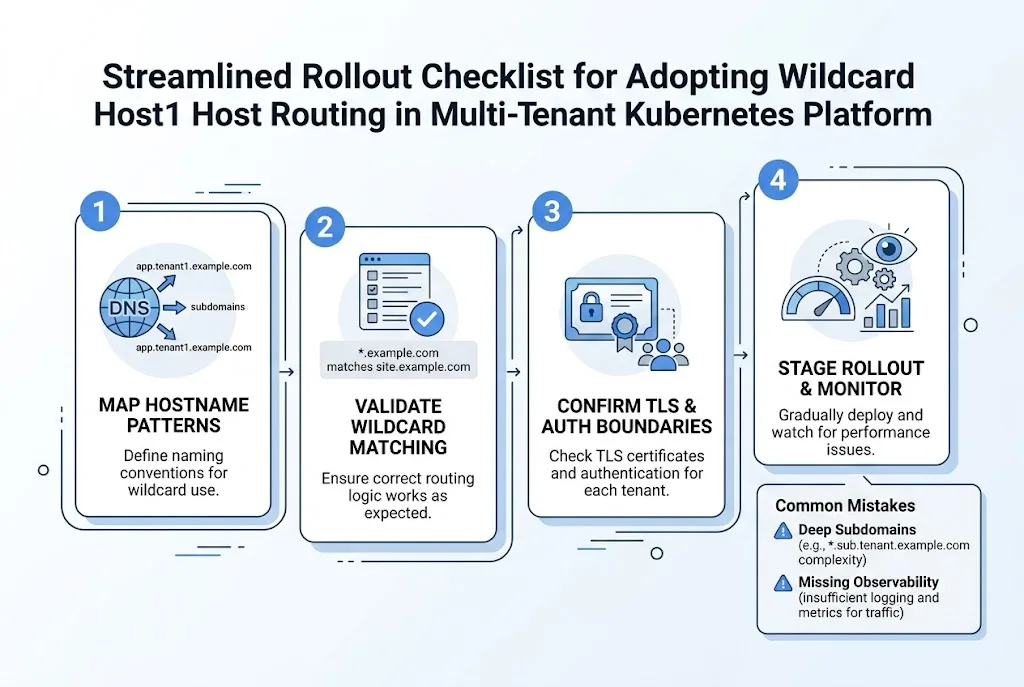
If your team sees similar rule growth, this is the checklist worth following.
Document every hostname family by:
Do this before changing any routing.
Look for hostname families where a single wildcard is actually correct. Do not force wildcards where the domain structure is inconsistent.
This is where many teams get tripped up. Kubernetes wildcard hosts only cover one DNS label. If your pattern is deeper than that, you may need multiple wildcard levels or a different naming model.
If you use ALB, Kubernetes Ingress, and Istio, review all three layers at once. A wildcard plan that works at the cloud load balancer layer but not at the gateway layer will not reduce operational pain.
Wildcard routing usually implies wildcard certificate planning too. Make sure certificate issuance, renewal, and boundary ownership are explicit.
You should be able to answer:
If you are standardizing platform observability, Shakudo’s broader integrations ecosystem and support for tools like Prometheus and Grafana are highly relevant here.
Start with non-critical environments. Confirm that host matching, certificates, redirects, and service ownership all behave as expected before production cutover.
The real takeaway from this case is not just “wildcards are useful.”
It is this:
Ingress design is part of platform scalability.
Teams often treat routing as a thin layer in front of the real system. But in multi-tenant platforms, routing rules are part of the system. They shape how fast environments can be provisioned, how safely services can be exposed, and how easily production upgrades can happen.
In this customer case, the team moved from identifying the rule-growth pattern to removing the blocker within days. That is a good outcome. But the more useful lesson is that platform teams should design for this class of problem before it appears.
If your architecture assumes the platform will keep adding tenants, services, and environments, your ingress model should scale at the same rate.
AWS documents a default quota of 100 rules per Application Load Balancer excluding the default rule, and that quota can be adjusted. The exact number in your environment may vary if quotas have already been increased, but the key point is that ALB rule growth is finite and worth tracking.
Sometimes, yes in the short term. But if each new tenant or subdomain keeps adding more explicit rules, the underlying architecture will still create operational drag later.
No. In Kubernetes Ingress, wildcard matching covers a single DNS label. That means *.example.com matches app.example.com but not api.app.example.com.
Yes, if the gateway and VirtualService host model are designed correctly. Istio documents wildcard support at the gateway layer, but teams should still validate the exact host patterns they use.
As soon as your platform automatically provisions routes for tenants, projects, or environments. If hostname creation is part of your product or platform workflow, you should review routing growth before it becomes urgent.
A simple one is this: if every new project, workspace, or environment creates several more domains and each of those creates more routing rules, you already have the ingredients for rule sprawl.
If your team is building a multi-tenant data or AI platform on Kubernetes, this is exactly the kind of scaling issue that is easier to fix early than under production pressure.
The Shakudo Platform helps teams simplify the infrastructure behind modern data and AI systems, including the layers around orchestration, deployment, governance, and operational scale.
If you want help reviewing your ingress model, wildcard strategy, or broader platform design, contact Shakudo.